
Transform

Shape

Reshapes velocity or CC values using compression, expansion, output range limiting, and a fully editable transfer curve. Works on both note and CC rows.

Overview
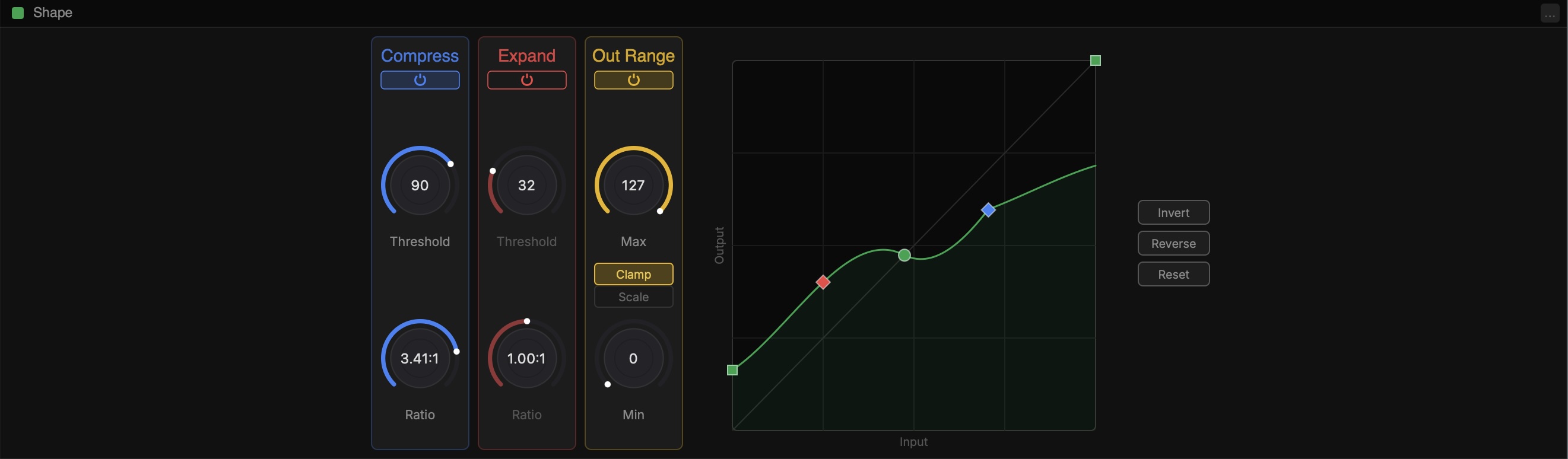
Scheps Shape overview

Shape has two sets of controls. The left set contains three processor columns — Compress, Expand, and Out Range — each with its own bypass button. The right side contains the curve editor with Invert, Reverse, and Reset buttons.

All three processors control the curve. The curve is the result of all three processors plus whatever custom changes you make.

Compress

Modifies the values of velocities above the threshold. Higher ratios bring louder velocities closer to the threshold.

ThresholdThe velocity above which compression is applied. 0-127.
RatioHow strongly values above the threshold are reduced. 1:1 = no compression, 8:1 = heavy compression.
BypassPower icon at the top of the column. Disables compression without removing the settings.

Expand

Changes the value of velocities below the threshold. Useful for making soft playing more expressive or boosting quiet velocities.

ThresholdThe value below which expansion is applied.
RatioHow strongly values below the threshold are boosted.
BypassDisables expansion without removing the settings.

Out Range

Limits the output to a range between Min and Max values.

MaxThe maximum output value (0-127).
MinThe minimum output value (0-127).
Scale / ClampScale maps the full curve output into the Min-Max range. Clamp hard-limits output to the range.
BypassDisables output range without removing the settings.

Curve Editor

The curve editor shows the transfer function — what goes in on the X axis, what comes out on the Y axis. Drag points to reshape the curve. Right-click points to delete them.

InvertFlips the output — high values become low and vice versa.
ReverseFlips the curve horizontally.
ResetRestores the curve to its default linear shape.
Add BreakpointsDouble-click on the curve to add new breakpoints.
Delete BreakpointsRight-click on a point to delete it.
BezierOption-click and drag to change the spline of an existing user breakpoint.