
Transform

ADSR

A note-triggered envelope generator. Playing a note fires an Attack / Decay / Sustain / Release envelope that is streamed out as CC. The shape of every stage is fully editable. Works on CCs only.
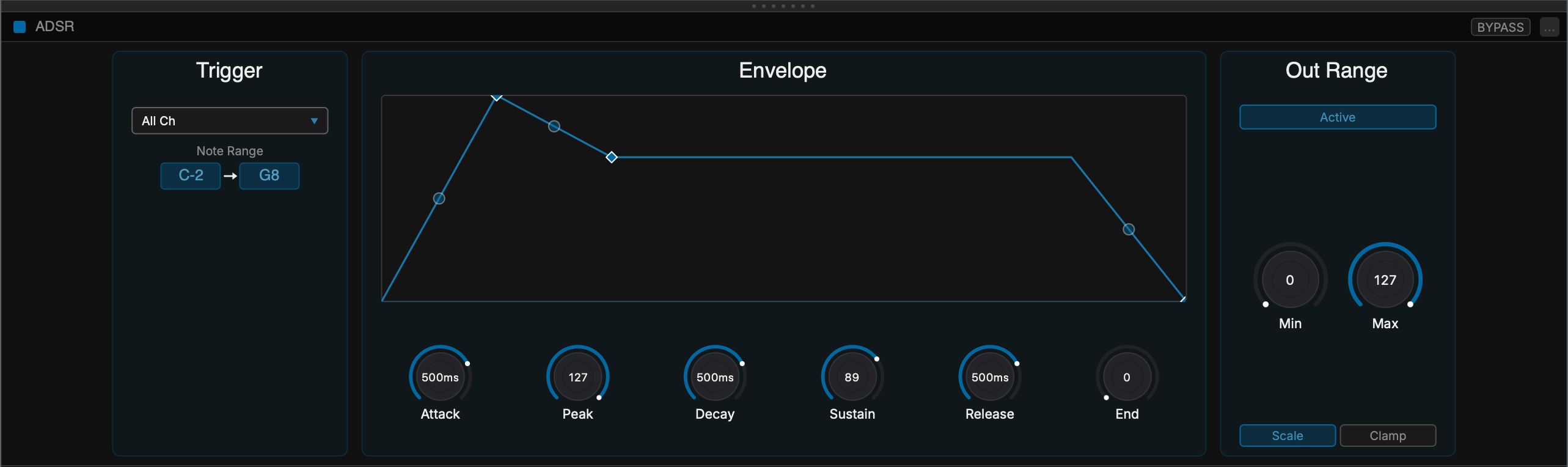
Scheps ADSR overview

How It Works

Unlike the other CC generators, the ADSR is triggered by notes. It watches the incoming MIDI for note-ons that match its Trigger settings without consuming them, so every other row still receives those notes. A matching note starts the envelope; the envelope output is sent as CC on the row's output CC number.

The ADSR is monophonic and will enter decay whenever the last note played is released. The Sustain stage holds for as long as the note is held.

Trigger

ChannelWhich MIDI channel triggers the envelope. Set to All, or a specific channel 1-16.
Note RangeOnly note-ons between the low and high notes trigger the envelope. Click a field to type a note, or use MIDI learn.

Envelope

The graph shows the full envelope. Three diamonds mark the end of each stage: the Attack peak, the Decay (Sustain) level, and the Release end. Each diamond has a Time and a Level knob, and can be dragged directly in the graph — drag horizontally to change the stage time, vertically to change its level.

AttackTime and level to ramp from zero up to the peak when a note starts.
DecayTime and level to fall from the peak to the Sustain level.
SustainThe Decay level is held here for as long as the note is held — there is no Sustain time.
ReleaseTime and level to fall from the current level to the end level when the note is released.
Time axisThe graph auto-scales so the envelope always fills the grid. The width represents the three stage times plus a fixed two seconds of Sustain.
Curve handlesThe dot at the midpoint of each stage bends its shape from linear toward a steeper curve. Drag it vertically; double-click or option-click to reset to linear.

Out Range

Out Range maps the envelope into a chosen output range, just like in Shape. It reshapes the drawn envelope and the CC output together.

Active / BypassedToggles the Out Range stage on or off. On by default.
Min / MaxThe output range the envelope is mapped into.
ScaleScales the whole envelope to fit between Min and Max.
ClampLeaves the envelope as is but clamps it at the Min and Max bounds.