
Transforms
The Transform Chain
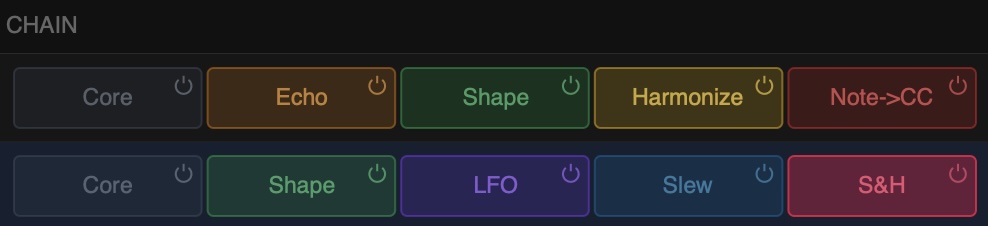
Each row has a chain of up to four transforms plus a Core slot. MIDI flows through the chain from left to right, with each transform modifying the signal before passing it to the next.
How the Chain Works
The Core slot (leftmost pill) is always present and contains the Basics editor for that row type — transpose and velocity controls for note rows, offset and scale for CC rows.
The four transform slots to the right of Core can hold any compatible transform. Transforms are compatible based on what type of signal they expect and what type they produce. SMT enforces this automatically — the add menu only shows transforms that are valid at each position.
For example, a Slew transform only works with CC signals, so it cannot be placed after an Echo on a note row.
Adding Transforms
Click an empty slot in the transform chain to open the add menu. Only compatible transforms are shown. Click a transform to add it.
Transforms can be reordered by dragging their pills within the chain. Right-clicking a filled pill opens a context menu with bypass, duplicate, copy, paste, save preset, and delete options. You can also change the transform from this menu.
Basics (Core Slot)
The Core slot holds the Basics editor, which provides the simplest controls for the row. Click the Core pill to open it.
Note Basics
Three Transforms: Transpose (by octave and semitone), Velocity (offset and scale), and Timing (delay in milliseconds).
In remap mode, the Transpose island is replaced by a button to open the Remap Editor.
CC Basics
Three Transforms: Offset, Scale and Timing (delay in milliseconds).
All Transforms
Echo
Delay and repeat notes with tempo sync and rhythm mode.
Shape
Reshape velocity and CC curves with compress, expand, and advanced controls.
Harmonize
Quantize to scale and generate chords with keyswitch control.
LFO
Modulate CC values with a customisable low-frequency oscillator.
ADSR
A note-triggered envelope generator streamed out as CC.
Slew
Smooth CC transitions with lag and tempo-synced slew.
Sample & Hold
Sample random CC values at a set rate with slew smoothing.
CC to Note
Convert CC messages into MIDI notes across a configurable range.
Note to CC
Map note numbers to CC values with slew smoothing.
Channel Router
Route notes to different MIDI channels based on pitch and input channel.