
Transform
LFO
Modulates CC values with a low-frequency oscillator. Fully customisable waveform, tempo sync, trigger modes, and output range. Works on CCs only.
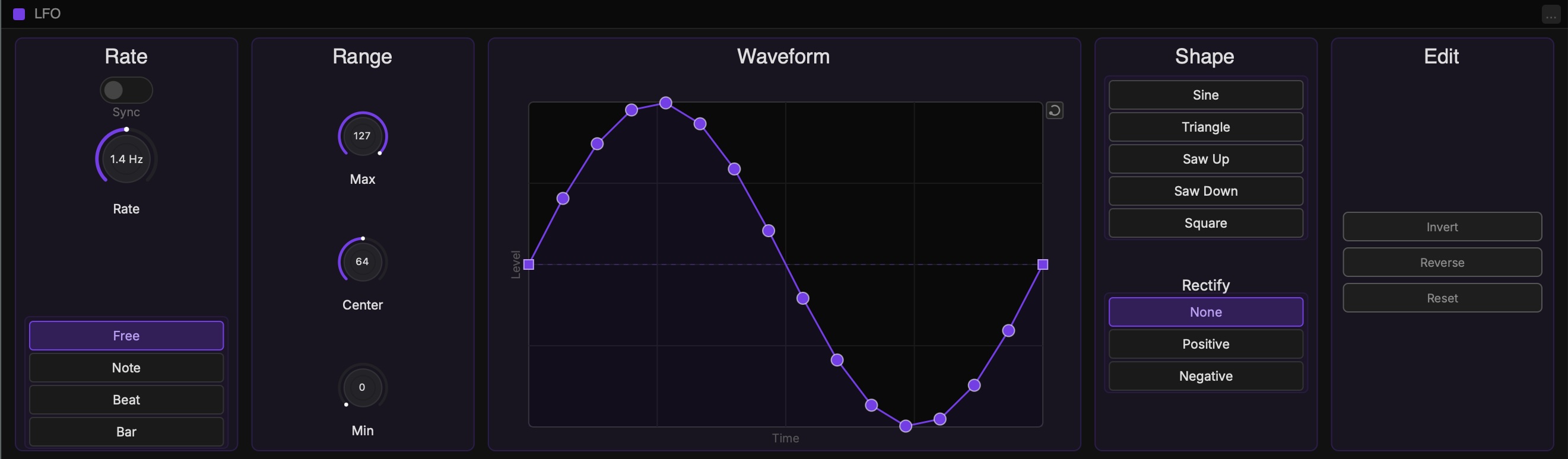
How It Works
The LFO uses incoming CC messages as a gate. When a CC value above 64 is received, the LFO activates. The original CC value is consumed and replaced by the LFO output.
The LFO runs continuously in the background.
Rate
Sync toggleSwitches between free rate and tempo-synced rate.
Rate knobIn free mode: LFO frequency in Hz (0.1 to 20 Hz). In sync mode: note value division.
Trigger modeFree: runs continuously. Note: resets on each CC gate. Beat: resets on each beat. Bar: resets on each bar.
Range
Out MinThe minimum CC value the LFO will output.
Out MaxThe maximum CC value the LFO will output.
CenterThe midpoint of the output range. Adjusting Min or Max preserves the center ratio.
Shape
Waveform presetsFive preset waveforms: Sine, Triangle, Saw Up, Saw Down, Square. Click to load. Note: This will remove any custom breakpoints
Waveform editorDraw your own waveform by dragging the breakpoints. Add breakpoints to create custom shapes.
RectifyNone: full waveform output. Positive: negative portions fold upward. Negative: positive portions fold downward.
Add BreakpointsDouble-click on the curve to add new breakpoints.
Delete BreakpointsRight-click on a point to delete it.
BezierOption-click and drag to change the spline of an existing user breakpoint.