
Transform
Channel Router
Routes notes to different MIDI channels based on note number and input channel. Useful for driving multi-channel instruments, sample libraries with articulations on different channels, or splits. Works on notes only.
Overview
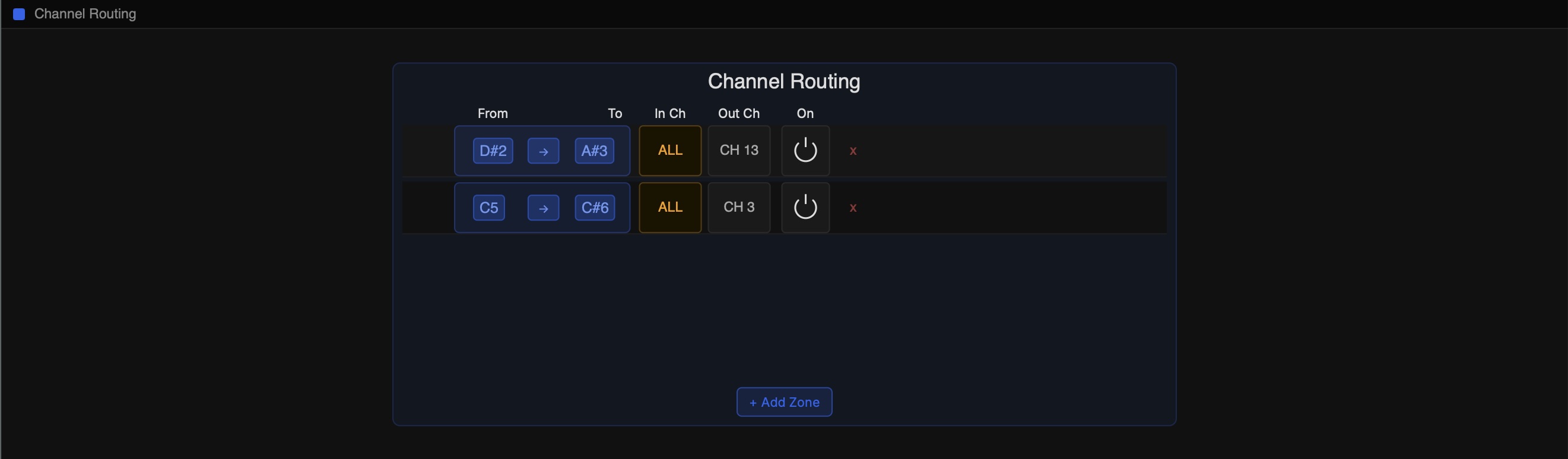
Channel Router is accessed via the Out Ch column on a note row — click the output channel pill and select Custom Routing. It opens a dedicated editor at the bottom of the plugin.
Unlike other transforms, Channel Router does not occupy a slot in the transform chain. It is applied after all chain transforms have processed the note.
Zones
The router uses a list of zones. Each zone specifies a note range, an optional input channel filter, and an output channel. When a note matches a zone, it is sent to that zone's output channel.
Zones are evaluated in order from top to bottom. The first matching zone wins. If no zone matches, the note passes through on its normal output channel.
Notes
- •Channel Router zones are saved as part of the row preset and persist with the session.
- •The output of your transform chain is what is routed through Channel Router zones.
- •MIDI Learn works for zone note fields — click a From or To button with MIDI Learn active and play a note.